
5F, W2, Chengxin Building , Tian An Shen Chuang Valley Industrial Center, Fenggang Town, Dongguan City, Guangdong Province,China 523681
Views: 0 Author: Site Editor Publish Time: 2026-09-16 Origin: Site


Modern IT, AV, and smart-space deployments increasingly rely on USB-C devices. Tablets, thin-and-light laptops, and streaming gear dominate these fast-paced environments. However, providing simultaneous high-speed data and continuous power over long distances remains a critical bottleneck. Traditional Wi-Fi often introduces frustrating latency in mission-critical applications. Furthermore, relying on standard AC adapters severely restricts where you can place a device. You end up awkwardly tethered to nearby wall outlets.
The market demands a smarter, more integrated approach. We introduce the POE Driver as the definitive commercial solution to this connectivity problem. It effectively delivers up to 100 meters (328 ft) of combined power and data over a single ethernet cable. In this guide, you will discover how these adapters function, how to evaluate their actual power yields, and how to avoid common deployment pitfalls to ensure a stable, uninterrupted network.
A single POE driver can convert standard IEEE 802.3af/at/bt PoE into USB-C PD (Power Delivery) and Gigabit ethernet.
Commercial-grade adapters prevent network drop-outs during PoE switch reboots, a common failure in budget models.
Actual power delivery is subject to line loss; a 15W advertised spec may yield ~12W at the device.
Device compatibility hinges on OS-level ethernet drivers (some Android/mobile devices lack native support).
Device placement often dictates the success of a technology deployment. Standard USB-C and standard AC power cables limit your reach to just a few meters. If you need a scheduling display outside a boardroom or a camera mounted on a high ceiling, local power outlets rarely exist exactly where you need them. Power over Ethernet (PoE) solves this physical limitation. It extends your deployment radius up to a full 100 meters (328 ft). You can power endpoints directly from a centralized network switch without routing complex electrical wiring.
Wireless networks also struggle in high-density environments. Crowded classrooms, busy hospital wings, and dense office spaces constantly fight wireless interference. Tablets or laptops relying on Wi-Fi will eventually drop packets. A hardwired connection guarantees the low-latency data required for mission-critical tasks. Live broadcasting workflows utilizing NDI video streams demand flawless data packets. IT professionals performing remote network troubleshooting also rely on absolute stability. A physical cable removes the unpredictability of wireless channels.
Safety and compliance present another strong argument for unified cabling. End-user devices placed in public spaces or educational facilities face strict safety regulations. Utilizing low-voltage PoE eliminates the need for 110V or 220V AC outlets near the user. Many high-quality adapters feature 1500V isolation circuit protection. This design secures the end device against unexpected electrical surges. You keep hazardous high voltage inside the server room while delivering safe, low-voltage power directly to the user's hands.
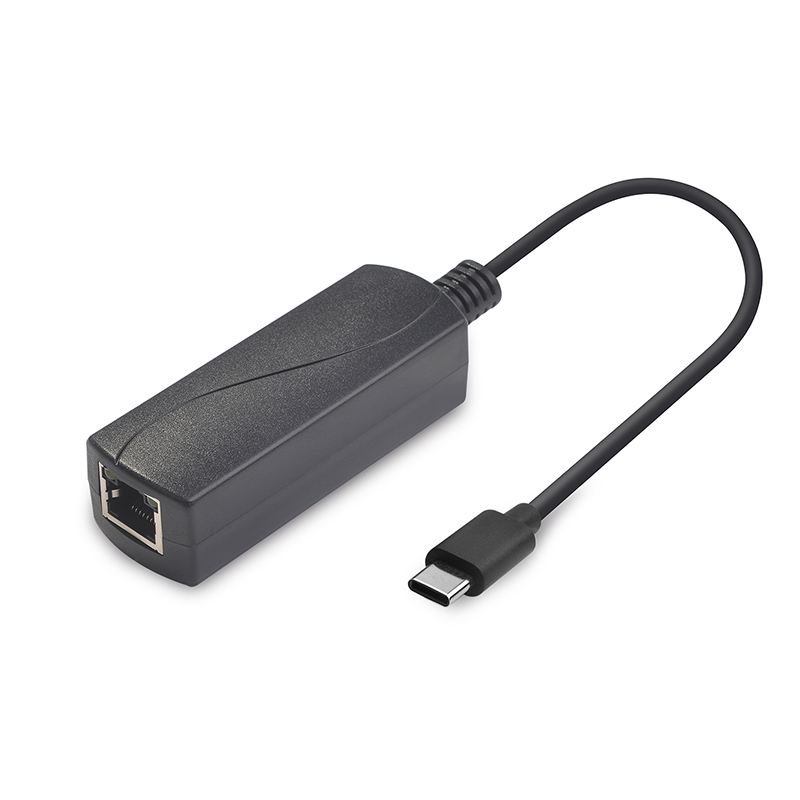
Understanding how a PoE to USB-C Adapter bridges two entirely different technology standards is crucial for proper deployment. Network switches output power using IEEE 802.3 standards. Modern endpoint devices expect power negotiated via USB-C Power Delivery (PD 3.0). The adapter sits in the middle. It takes 48V to 54V direct current from the ethernet cable, steps it down to a usable voltage (like 5V, 9V, 15V, or 20V), and handshakes with the endpoint device to deliver exactly what it needs.
Power availability falls into three distinct tiers. You must match the switch capability to the endpoint requirement.
IEEE Standard | Common Name | Max Switch Output | Estimated Yield at Device | Ideal Use Cases |
|---|---|---|---|---|
802.3af | PoE | 15.4W | ~10W to 12W | Basic smart displays, mobile phones, small IoT sensors. |
802.3at | PoE+ | 30W | ~23W to 25W | Heavy-use tablets, POS systems, basic thin laptops. |
802.3bt | PoE++ | 60W to 90W | ~45W to 71W | Performance laptops, industrial equipment, large AV hubs. |
Power represents only half of the equation. Data throughput capabilities vary significantly across different models. Many entry-level adapters cap data speeds at 10/100Mbps. This speed perfectly handles meeting room scheduling screens or basic sensor reporting. However, IT debugging, NDI video streaming, and large file transfers mandate a Gigabit ethernet model. Using a 10/100Mbps adapter on a modern laptop will artificially choke your network speed, completely negating the benefit of a wired connection.
Selecting the right hardware separates a flawless deployment from a maintenance nightmare. Engineers must evaluate adapters beyond their marketing sheets. Use the following framework to assess viability before a large-scale rollout.
Assess Reliability Under Network Stress: Commercial setups must survive inevitable network switch reboots. When a switch restarts, power drops momentarily. Budget consumer adapters frequently fail to auto-reconnect the data link after power returns. This failure requires a technician to walk over and physically unplug and replug the USB-C cable. Commercial-grade adapters feature dedicated microcontrollers to ensure seamless data reconnection without human intervention.
Calculate True Power Yield vs. Advertised Specs: Never trust the theoretical maximum. Cable degradation and DC-to-DC conversion cause unavoidable power loss. If you run 100 meters of Cat6 cable, resistance lowers the available wattage. If a specific laptop strictly requires 45W to charge under heavy load, do not buy an adapter rated for a 45W maximum. You will fall short. Instead, specify a 60W (802.3bt) adapter to guarantee adequate overhead.
Verify Infrastructure Prerequisites: Your existing network closet dictates what you can deploy at the edge. A high-end 802.3bt adapter will not magically produce 60W if you plug it into an older 802.3af switch. If the facility's current switches lack high-power PoE capabilities, you must install a midspan PoE Injector. This standalone unit injects the necessary power budget into the ethernet line before the cable reaches the endpoint.
Hardware compatibility rarely guarantees software support. The most common pitfall in these deployments is the OS driver trap. Just because a tablet has a USB-C port does not mean it understands ethernet data. Some consumer Android tablets have their native ethernet drivers intentionally stripped from the operating system by the manufacturer. If you plug an adapter into one of these restricted devices, it will charge perfectly, but the data portion remains entirely useless. Always verify system-level driver support before ordering bulk quantities.
Your choice of connecting cables also introduces significant risk. Many deployment failures stem from the final USB-C to USB-C connection between the adapter and the device. OEM charging cables bundled with smartphones or tablets often lack the necessary pins for high-speed data transfer. They exist purely to carry current. You must ensure you use high-spec, fully compliant cables rated for both Power Delivery and USB 3.0 or higher data speeds.
Finally, consider thermal management in your deployment environment. Adapters converting 60W or more of continuous power inevitably generate heat. If you install an adapter inside a sealed wall box or tightly behind a digital signage screen, it needs to dissipate that heat safely. Prioritize adapters built with premium metal housing and deliberate thermal design over cheap plastic alternatives. Overheating adapters will throttle power output or drop the network connection entirely to protect themselves.
The versatility of these adapters unlocks numerous practical applications across various industries. Real-world scenarios demonstrate their immediate value.
Meeting Room and Smart Space Displays: Corporate offices frequently mount iPads or Android tablets directly to glass walls to act as room scheduling screens. Running standard AC power to a glass wall is often physically impossible. A single ethernet cable dropped from the ceiling provides continuous trickle charging. It also secures the tablet to the corporate network, keeping schedule data instantly synced and preventing unauthorized wireless access.
IT On-Site Troubleshooting: Network engineers frequently debug hardware inside cramped server closets or on factory floors. Carrying bulky laptop power bricks is cumbersome. Equipping engineers with a high-power adapter allows them to plug directly into an active switch port. They draw power and establish a Gigabit data link simultaneously. This setup proves incredibly valuable when tuning NDI video feeds or configuring new access points from a ladder.
Remote and Outdoor Monitoring: Researchers and security professionals often deploy sensors, observation cameras, or low-power compute nodes in isolated areas. These locations typically lack Wi-Fi coverage and mains power. By running durable landscape ethernet wiring or standard Cat6 underground, a centralized switch can reach distant nodes. The adapter provides stable power to a USB-C micro-computer or camera, ensuring non-stop observation regardless of weather or battery limitations.
Deploying a unified power and data strategy requires careful planning, but the operational stability it yields is unparalleled. By eliminating AC adapters and bypassing crowded Wi-Fi networks, you create a robust, highly predictable hardware environment.
Assess your end device power needs realistically, factoring in expected line loss over distance.
Verify that your chosen tablet or laptop OS actively supports external ethernet drivers.
Choose the correct protocol tier (af, at, or bt) matching your device's exact demand.
Audit your current network switches. Determine immediately if you need a complementary midspan injector to provide the missing power budget.
Always acquire a single unit to test the full hardware chain—from the switch to the specific USB-C cable to the endpoint device—before committing to a bulk installation. This simple step prevents major compatibility headaches down the line.
A: Generally, no. Modern Windows, macOS, and Linux operating systems offer true plug-and-play support for these adapters. They utilize standard USB networking protocols. However, mobile operating systems present challenges. Some budget Android tablets lack the native ethernet drivers required to recognize the data connection. Always test mobile hardware beforehand.
A: Yes, but you must select an adapter utilizing the IEEE 802.3bt (PoE++) standard. These units supply between 45W and 90W. If you use a lower-tier adapter, the laptop battery will slowly drain under heavy processing loads because the power draw exceeds the adapter's maximum supply rate.
A: You can easily solve this by adding a standalone midspan injector to your network rack. You plug your standard data-only switch into the injector, and the injector adds the necessary electrical current to the line before sending it out to your edge device.
A: This issue usually stems from two culprits. First, you might be using a basic charging cable that lacks internal data pins. Swap it for a high-speed data cable. Second, your tablet or phone operating system may intentionally restrict external ethernet connections at the software level.


