
5F, W2, Chengxin Building , Tian An Shen Chuang Valley Industrial Center, Fenggang Town, Dongguan City, Guangdong Province,China 523681
Views: 0 Author: Site Editor Publish Time: 2026-08-24 Origin: Site


Upgrading legacy IP phones, basic IP cameras, or low-bandwidth IoT devices to modern networks often hits a frustrating wall. Endpoints frequently lack native Power over Ethernet support. A Megabit POE Splitter effectively bridges this exact gap. It securely isolates direct current power from your RJ45 data line. You can utilize existing Cat5e or Cat6 infrastructure easily. This clever setup avoids expensive endpoint replacements across your entire facility.
While the market aggressively pushes Gigabit solutions for everything, standard Fast Ethernet splitters remain the smartest choice. They offer spec-accurate performance for legacy endpoints. This guide breaks down how to evaluate, specify, and procure these specialized network devices. You will learn how to deploy them seamlessly. We will show you how to do this without introducing network bottlenecks or hidden electrical risks.
Spec Matching: Most IP phones and basic access control systems rely on built-in 100Mbps switches; paying a premium for Gigabit splitters yields zero performance gain in these setups.
Safety First: IEEE-compliant (802.3af/at) splitters use active negotiation to prevent endpoint burnout, unlike "passive" alternatives.
Terminology Trap: Do not confuse a PoE Splitter (outputs DC power + data) with a PoE Extender/Switch (outputs PoE).
Real-World Loss: Factor in power dissipation over cable runs; a 15.4W source delivers a guaranteed 12.95W to the end device.
Hardware realities often dictate your network design. Many enterprise IP phones feature internal Fast Ethernet Network Interface Cards. Even higher-end legacy models from Cisco or Avaya use 100Mbps components. Manufacturers do this intentionally to reduce production expenses. Basic IoT sensors and access control panels follow the same design logic. They simply do not require massive data pipes to function perfectly.
Deploying a Gigabit splitter for a Fast Ethernet endpoint introduces unnecessary hardware costs at scale. You end up paying for bandwidth capacity the device physically cannot process. A dedicated 100Mbps PoE Splitter perfectly aligns your infrastructure. It matches the maximum throughput of your target device. This prevents wasteful over-specification across large enterprise deployments.
Consider the actual bandwidth requirements of common office equipment. Most devices leave massive headroom on a standard 100Mbps link. We can break down typical consumption rates to illustrate this point:
Voice over IP (VoIP) Phones: Standard voice calls consume only 100 Kbps of bandwidth.
Basic Telemetry Sensors: Temperature or door sensors use mere bytes per minute.
1080p H.264 IP Cameras: A steady high-definition video stream typically requires just 2 to 4 Mbps.
Access Control Panels: Badge readers transmit tiny data packets, rarely exceeding 50 Kbps.
A Fast Ethernet splitter handles these loads flawlessly. You gain reliable power delivery without paying a premium for unused Gigabit data speeds.
Understanding power delivery standards separates safe deployments from disastrous hardware failures. You must distinguish between "compliant" and "compatible" devices. Standard IEEE 802.3af (PoE) and 802.3at (PoE+) splitters are fully compliant. They execute a vital active negotiation process. The splitter communicates directly with the Power Sourcing Equipment before initiating power delivery.
This active handshake verifies exact power requirements. It confirms voltage needs before sending any current down the cable. This intelligent process protects sensitive non-PoE endpoints from unexpected surges. Conversely, cheaper "passive" splitters are merely compatible. They skip the handshake entirely. They force raw power down the line continuously. This presents a massive risk of severe equipment damage if mismatched.
Quality splitters also provide vital voltage output flexibility. Endpoint devices require very specific direct current levels to operate safely. High-grade splitters offer integrated DIP switches or fixed output options. You can manually match the exact DC barrel requirements of various devices.
Feature | IEEE Compliant (802.3af/at) | Passive (Compatible Only) |
|---|---|---|
Active Handshake | Yes. Verifies power safely. | No. Forces power continuously. |
Burnout Risk | Extremely Low. | High if voltage is mismatched. |
Overload Protection | Built-in automatic shutoff. | None. May damage endpoints. |
Typical Use Case | Enterprise IT, sensitive hardware. | Temporary DIY projects only. |
Network administrators often worry about potential speed drops. The "Gigabit Downgrade" myth frequently surfaces in IT forums. Users complain their Gigabit network drops to 100Mbps when daisy-chaining an IP phone. They mistakenly blame the separation of power and data. However, this downgrade usually stems from a hardware limitation inside the endpoint itself.
Many IP phones utilize internal passthrough switches built strictly for Fast Ethernet. They only use two pairs of wire instead of the four pairs required for Gigabit. The splitter does not throttle the broader network. It simply forces auto-negotiation to match the connected endpoint's physical hardware limits.
Latency is another common concern during implementation. The physical separation of power and data does introduce latency. However, it occurs strictly at the microsecond level. A microsecond delay remains entirely negligible for VoIP calls. It will not disrupt standard video streams or telemetry data. Human ears and eyes cannot perceive this microscopic delay.
Electrical noise poses a much more realistic threat. Low-quality power transformation inside cheap splitters introduces severe electromagnetic interference. This interference degrades data integrity. It causes static during VoIP calls and triggers packet loss. You should look for shielded RJ45 jacks. Metal shielding protects sensitive data streams from nearby electrical noise.
Check Passthrough Limits: Always verify the internal switch rating of daisy-chained devices.
Use Shielded Cables: Shielded Cat6 cables prevent cross-talk near industrial power lines.
Monitor Packet Loss: Test VoIP lines for jitter after installing new splitters.
Avoid Passive Adapters: They frequently introduce unshielded electrical noise into data lines.
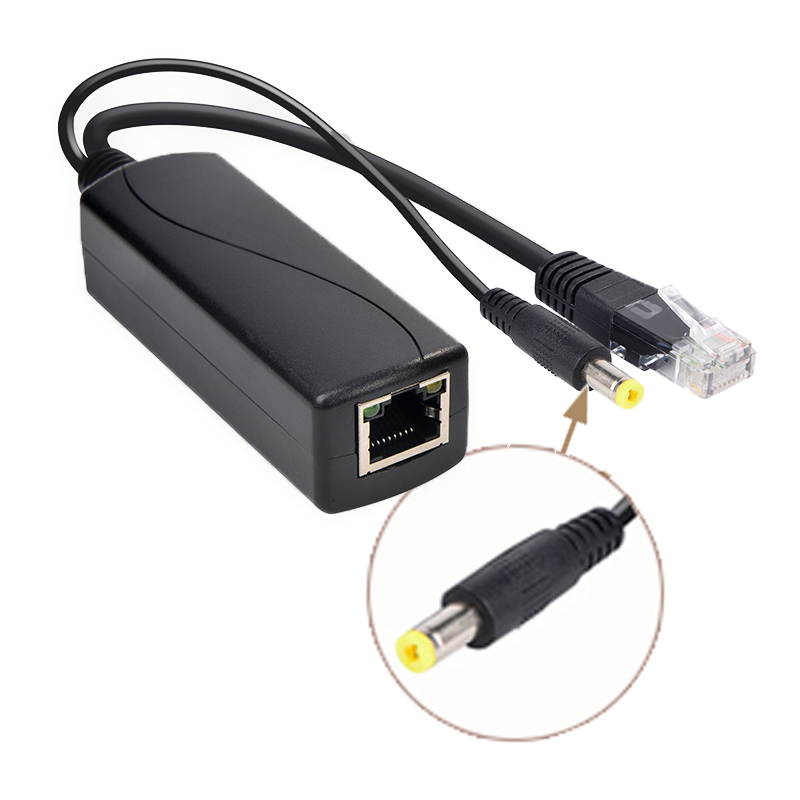
Proper power sizing ensures your endpoints remain stable under heavy usage. You must understand the synergy between sourcing and extracting equipment. A PoE Injector adds power to a data line at the network switch. Conversely, the splitter extracts this power at the remote endpoint. Both devices must share the same IEEE standard rating to function correctly.
Calculating accurate power dissipation prevents endpoint brownouts. Power degrades naturally as it travels through copper Ethernet cables. You cannot expect the full source wattage to reach the endpoint. Standard IP phones typically utilize the 802.3af standard. The injector provides 15.4W at the source. Due to cable resistance, the splitter delivers a guaranteed 12.95W safely.
Heavy-load endpoints require more robust planning. Devices like touch-screen VoIP phones or motorized PTZ cameras draw significant current. Standard 802.3af cannot support them. You must ensure the splitter carries a PoE+ rating. The 802.3at standard delivers up to 25.5W of available power at the endpoint. This easily handles high-draw screen displays and motorized components.
Cable distance strictly limits power and data delivery. The Ethernet standard restricts single cable runs to exactly 100 meters. This equals about 328 feet. Beyond this physical limit, power dissipation becomes too severe. Data packets also begin dropping rapidly. You will require active network extension hardware if your endpoints sit beyond this range.
IEEE Standard | Injector Source Power | Guaranteed Splitter Output | Ideal Endpoint Type |
|---|---|---|---|
802.3af (PoE) | 15.4W | 12.95W | Basic IP Phones, Sensors |
802.3at (PoE+) | 30.0W | 25.5W | PTZ Cameras, Touch Displays |
Sourcing reliable network hardware demands strict attention to technical details. Vendors sometimes use confusing marketing terms to sell mismatched equipment. You must enforce strict terminology validation during procurement. Ensure vendors are selling a true splitter. It must separate data and direct current into two distinct outputs. Do not accidentally purchase a two-port PoE switch masquerading as a splitter.
Environmental factors dictate specific protective features. Devices installed near exterior walls face unique dangers. Industrial floors carry heavy static electricity risks. You must verify the splitter features robust electrostatic discharge protection. Surge grounding prevents sudden voltage spikes from frying your connected IP cameras or access panels.
Build quality directly impacts network uptime. Cheap plastic splitters often warp under continuous heat loads. You should check for broad operating temperature ranges. Quality units handle environments from freezing up to 50 degrees Celsius. TAA compliance matters greatly for government or large enterprise bids. Furthermore, FCC and CE certifications guarantee the unit will not disrupt surrounding wireless signals.
Many buyers ignore the physical DC plug dimensions. A splitter might output the correct 12V, but the barrel plug might not fit the phone. Always verify the barrel connector size. It usually measures either 5.5x2.1mm or 5.5x2.5mm. Mismatched plugs cause loose connections and random device reboots.
Another frequent error involves mixing incompatible standards. Buying a PoE+ injector but pairing it with a standard PoE splitter wastes potential power. The system defaults to the lowest common denominator. You will only receive 12.95W at the endpoint. Always match your source and extraction hardware protocols precisely.
A fast ethernet splitter offers a highly practical solution for legacy networks. It serves as a reliable bridge for low-bandwidth endpoints. You can safely power older IP phones and basic sensors without massive infrastructure overhauls. Success requires strict adherence to IEEE negotiation standards. Passive alternatives remain too risky for professional deployments.
Audit your endpoints thoroughly before purchasing hardware. Verify their exact voltage requirements carefully. Check their internal network interface limits to avoid overpaying for gigabit gear. Match your selected endpoints with an appropriately rated IEEE compliant splitter. Finally, pair the system with a matching injector to guarantee stable, continuous power delivery.
A: No. A 100Mbps PoE Splitter will cap the local link to the attached device at 100Mbps. This is ideal if the endpoint, like an IP phone, only supports 100Mbps anyway. It does not throttle the broader network or impact other connected devices.
A: A PoE Injector combines data and power at the source to send over an Ethernet cable. A PoE Splitter sits at the end of the cable. It separates the power and data back into two distinct outputs for non-PoE devices.
A: Many IP phones and intermediate devices only possess Fast Ethernet passthrough switches. To maintain a Gigabit link to a PC, you must use Gigabit-rated endpoints and full 8-core cabling. Otherwise, auto-negotiation defaults safely to 100Mbps.
A: Yes. With the correct DC barrel adapter and voltage output, splitters are highly versatile. They are frequently used to provide UPS-backed power to micro-PCs, Raspberry Pi units, and smart LED controllers over existing Ethernet drops.


