
5F, W2, Chengxin Building , Tian An Shen Chuang Valley Industrial Center, Fenggang Town, Dongguan City, Guangdong Province,China 523681
Views: 0 Author: Site Editor Publish Time: 2026-11-02 Origin: Site


Network perimeters expand rapidly every single day. We push devices into increasingly complex and isolated environments. Facilities managers face serious hurdles when deploying modern equipment. Legacy wiring often disrupts straightforward installations entirely. Mismatched voltage outputs complicate your power matrix. Sometimes, standard AC power remains completely absent. Integrating modern network endpoints demands careful precision. Relying on makeshift power solutions severely compromises system reliability. Poor power delivery creates immediate security vulnerabilities. These structural shortcuts often cause unexpected hardware failures at the edge. You need a stable bridge between existing infrastructure and modern endpoints. This guide provides a vendor-neutral framework to evaluate your options. We help you shortlist and implement the correct hardware. You will learn to navigate technical specifications for commercial applications. This methodology ensures robust connectivity across your entire network architecture.
Hardware distinction is critical: Procurement errors often stem from confusing a generic PoE Converter with a PoE Splitter or PoE Driver.
Standards dictate success: Aligning hardware with strict IEEE 802.3af/at/bt standards prevents power handshake failures.
Environmental realities limit lifespan: Outdoor camera and AP deployments require converters with specific thermal and ingress protection (IP) ratings, not just standard IT-grade hardware.
Total power budget matters: Evaluating the peak power draw (including IR illumination on cameras or heavy load on APs) prevents unexpected reboots.
Upgrading wireless networks often reveals immediate power incompatibilities. Standard 48V switches cannot directly power 24V passive WISP equipment. Bridge antennas require precise voltage levels to function optimally. Installing dedicated electrical outlets at elevated locations wastes budget. You can bypass costly electrical work entirely. Using conversion modules leverages your existing switch infrastructure effectively. This approach maximizes your return on hardware investments significantly. Network engineers routinely face mismatched protocols during radio upgrades. A simple inline module translates standard power into passive formats seamlessly. You eliminate the need for bulky midspan injectors up on the tower.
Best Practice: Always verify the pinout configuration of your radio equipment before connecting passive modules.
Common Mistake: Forcing 48V active power into a 24V passive radio will permanently fry the mainboard.
Security teams often deploy IP cameras in remote zones. Parking lots and perimeter fences usually lack basic power outlets. Running new copper lines over long distances causes severe voltage degradation. We solve this by pairing wireless links with localized conversion. You place a power regulator near the camera housing. It regulates incoming power from a localized battery or solar array. This guarantees stable operation for critical surveillance equipment. Modern 4K cameras demand highly consistent power streams. They drop frames or reboot constantly when voltage fluctuates. Dedicated conversion ensures a clean energy supply for uninterrupted recording.
Building automation relies heavily on unified IP networks today. Legacy serial devices and access control panels complicate this integration. Non-networked sensors usually require separate, bulky power supplies. Converters eliminate the need for these disjointed power bricks. They allow legacy hardware to join modern networks seamlessly. You can power access panels directly from central core switches. This setup centralizes power management and improves system uptime. Facilities managers gain remote reboot capabilities for dumb serial devices. You streamline cable management inside cramped utility closets.
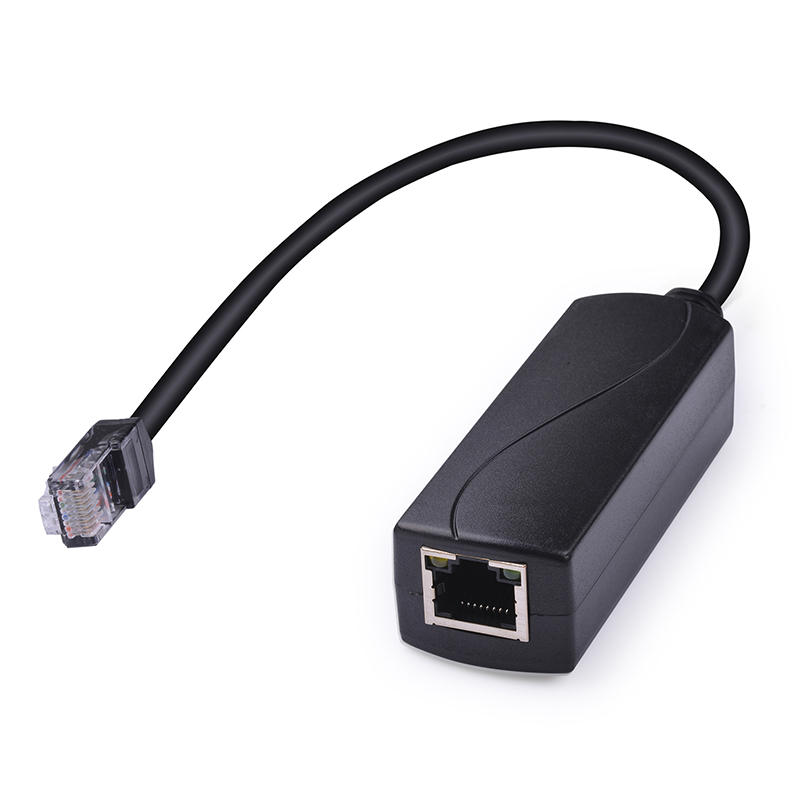
Engineers frequently misunderstand power conversion terminology. A PoE Converter actively steps up or steps down voltage. You might need to change 12V DC battery power into 48V IEEE-compliant power. It ensures the final output matches the endpoint's exact requirements. This active conversion protects sensitive network hardware from deadly surges. Step-down models drop standard 48V down to 24V for passive antennas. You use these units to bridge fundamentally incompatible power domains. They sit directly inline between the power source and the endpoint.
Legacy devices often lack internal processing capabilities for power-over-ethernet. A PoE Splitter solves this by dividing an incoming line. It separates standard ethernet into an RJ45 data cable. It also outputs a distinct DC power barrel connection. You typically use 12V or 5V outputs for non-compatible hardware. Mini-computers, raspberry pi units, and legacy displays rely on this separation. It allows you to power non-standard devices from a centralized switch. The data stream remains completely unaffected during this physical separation.
Some edge applications demand constant-current power delivery. A PoE Driver serves these highly specialized use cases primarily. You will find them installed in smart lighting setups. They also power specific industrial IoT sensor nodes. They handle constant-current applications rather than standard network routing. Drivers regulate the exact flow of electrons to prevent LED flickering. You rarely use drivers for standard IT hardware like routers. They belong strictly to specialized electrical engineering applications.
Device Type | Primary Function | Typical Output Format | Primary Use Case |
|---|---|---|---|
Converter | Steps voltage up or down actively | Standard RJ45 (Modified Voltage) | WISP radios, specialized IP cameras |
Splitter | Separates data and power streams | RJ45 Data + DC Barrel Power | Legacy non-networked devices, Pi units |
Driver | Provides constant-current delivery | Direct wire leads or USB-C | Smart LED lighting, industrial sensors |
You must align your switch output and converter input strictly. Modern switches use IEEE 802.3af, at, or bt standards. Active protocols negotiate power delivery before sending full current. Passive systems send power constantly without any safety negotiation. Mixing these improperly leads to catastrophic "silent failures" instantly. Devices simply refuse to power on under mismatched conditions. Ensure your hardware matches the exact IEEE handshake requirements perfectly. A bt-rated switch requires a bt-rated receiver to deliver 60W or 90W. Failing to match these handshake protocols halts deployments entirely.
Never size your hardware based on idle power draw. Endpoint devices experience massive spikes during active operational states. PTZ cameras engage high-torque motors to track sudden movements. Outdoor units activate internal heaters during freezing winter temperatures. Access points draw maximum wattage during peak wireless throughput states. We highly recommend calculating a 15 to 20 percent power buffer. This overhead prevents unexpected reboots during critical operations. If a camera pulls 25W at peak, avoid 30W-rated gear. You should step up to a 60W-rated module for safety. Undersized units degrade rapidly due to constant maximum load stress.
Standard IT-grade hardware fails quickly outdoors. Environmental realities dictate specific compliance requirements for external deployments. Deployments require extremely wide operating temperature ranges. Look for ratings spanning between -40°C and 70°C. Industrial-grade casings protect delicate internal components from moisture. NEMA enclosures shield units mounted high on utility poles. Verify the Mean Time Between Failures (MTBF) data points. Safety compliance certifications like UL, CE, and FCC signal trust. They remain absolutely non-negotiable for commercial enterprise networks. Salt fog resistance matters deeply for coastal surveillance deployments.
Copper cabling obeys strict physical limitations regarding distance. Long ethernet runs suffer from inevitable voltage degradation. Non-standard cable runs exacerbate this physical problem significantly. You can place a conversion unit at the end of the line. It stabilizes the fluctuating voltage effectively. This delivers clean power before it reaches a sensitive camera. Overcoming distance limits requires this targeted power regulation. Standard rules cap ethernet distance at 100 meters exactly. Using inline active regulators can push this boundary further safely. They reconstruct the signal and boost the voltage simultaneously.
Best Practice: Always use pure solid copper CAT6 cable for runs exceeding 50 meters.
Common Mistake: Utilizing Copper-Clad Aluminum (CCA) cable causes massive voltage drops and localized overheating.
Heat dissipation presents a hidden danger out in the field. Active power conversion generates considerable thermal output continually. Installers often place these units inside sealed outdoor junction boxes. Doing this ignores fundamental thermal dynamics completely. Trapped heat leads to rapid internal thermal throttling. The hardware degrades quickly and causes premature total failure. Always factor airflow and passive cooling into your enclosure designs. Aluminum heat sinks on the module casing help tremendously. Venting your NEMA boxes prevents solar loading from destroying your gear.
Engineers often try bridging multiple devices simultaneously. They use one power unit to drive a camera and a transmission unit. This setup carries significant operational risks. Data looping occurs frequently if improperly configured. Underpowering becomes highly probable during peak transmission loads. Check if your hardware is explicitly rated for dual-device bridging. Always rely on evidence-based capacity planning for wireless backhauls. A heavily loaded wireless bridge draws massive intermittent current. Sharing this power source with a mechanical PTZ invites sudden system crashes.
Approving a purchase order requires systematic verification. Guessing specifications leads to expensive field replacements. Use this structured approach to finalize your hardware selection.
Audit Endpoint Specs: Determine the exact voltage requirement. Verify the required IEEE standard. Document the peak wattage demands under maximum load.
Audit Sourcing Infrastructure: Identify your upstream power origination. Are you using an active IEEE switch? Are you drawing from a 12V battery array? Document the source limitations.
Select Form Factor: Choose the physical housing carefully. Do you need a DIN-rail mountable industrial unit? Does the project require a weatherproof IP67 outdoor module?
Verify Vendor Transparency: Demand explicit datasheet documentation. Reject products lacking clear operating temperature ranges. Insist on verifiable compliance certifications like UL and FCC.
Calculate Cable Impedance: Measure the exact physical distance of your copper runs. Calculate the expected voltage drop over that specific distance.
Successful edge networking depends entirely on stable power delivery. You must build your infrastructure on reliable electrical foundations. Choosing between a converter, splitter, or driver hinges on specific operational needs. You must match the voltage and data separation requirements precisely. Audit your device spec sheets for maximum power draw actively. Verify all IEEE standards before issuing any purchase order. Proper planning prevents catastrophic system failures out in the field. Take the time to calculate your required wattage overhead today.
A: Only if it is specifically IP-rated or housed within a weatherproof NEMA enclosure. Indoor-rated splitters will fail rapidly due to humidity and temperature fluctuations. Condensation destroys unprotected internal circuitry very quickly. You must use IP67-rated gear for direct outdoor exposure.
A: You typically require a specialized injector or a DC-to-PoE converter. You connect this to a localized battery or solar setup. This singular power source drives both the WiFi bridge and the camera. Ensure the power budget accommodates both devices simultaneously.
A: This is usually a symptom of exceeding the unit's peak wattage capacity. It also happens due to severe voltage drops over excessively long cable runs. Low-quality ethernet cables exacerbate this issue. Check your power buffer and replace CCA cables with pure copper.
A: Active conversion negotiates power delivery with the endpoint using IEEE standards. This protects sensitive equipment against dangerous power surges. Passive conversion sends power constantly without any safety negotiation. You risk permanent hardware damage if connected to incompatible equipment.


