
5F, W2, Chengxin Building , Tian An Shen Chuang Valley Industrial Center, Fenggang Town, Dongguan City, Guangdong Province,China 523681
Views: 0 Author: Site Editor Publish Time: 2026-07-29 Origin: Site


IT administrators and security installers constantly face a frustrating deployment hurdle. You map out the perfect location for a new endpoint. However, the ideal spot for your IP cameras or wireless access points sits just past the standard Ethernet boundary. You suddenly realize the designated installation zone stretches far beyond the reach of your existing network closet.
This strict boundary is not an arbitrary suggestion. The IEEE 802.3 standard caps standard twisted-pair Ethernet transmissions at 100 meters, or roughly 328 feet. Once you cross this physical limit, copper infrastructure struggles to push stable data and reliable power. Pushing connectivity further becomes an immediate engineering challenge.
This article provides a technical evaluation of retrofit solutions designed to bypass this limit. We will explore practical methods to extend your network footprint. You will learn how to achieve extended distances without enduring the massive capital expense of trenching new fiber optic lines.
Standard Cat5e/Cat6 hits a physical wall at 100m due to signal attenuation and DC voltage drop.
A POE Extender is the most cost-effective retrofit, amplifying both data and power over existing copper.
Daisy-chaining extenders works up to roughly 500m, but strict power budgeting is mandatory.
For outdoor deployments, galvanic isolation (fiber) or heavy-duty surge protection is non-negotiable to prevent lightning damage.
Avoid CCA (Copper Clad Aluminum) cables entirely; pure copper is required for extended-distance PoE.
Network limits stem from the fundamental laws of physics. The IEEE protocols restrict standard runs to 100 meters to guarantee data integrity and power delivery. When you push past this boundary, the physical copper medium begins to fail in predictable ways. Let us examine the three core constraints.
Ethernet transmits data using high-frequency electrical signals. These signals naturally degrade as they travel along a copper conductor. We call this process signal attenuation. Once the cable length exceeds 100 meters, the degradation becomes severe. Network switches struggle to interpret the weakened electrical pulses. This results in packet loss, dropped frames, and severe network latency. For sensitive devices like VoIP phones or high-resolution IP cameras, this signal loss renders the endpoint unusable.
Power over Ethernet relies on pushing direct current (DC) across the same copper wires. All copper wire possesses inherent electrical resistance. The longer you make the cable run, the higher the total resistance becomes. Higher resistance forces the voltage to drop before it reaches the edge device. A powered device (PD) requires a specific voltage window to boot up and operate. If the voltage drops too low over a long run, the camera or access point simply will not power on.
When you push power over network cables, the wires generate heat. Installers frequently bundle dozens of cables together in trays or conduits. Heat accumulates rapidly within these tight bundles. As the temperature rises, the electrical resistance of the copper increases even further. This thermal loop shrinks the effective delivery distance. High-draw devices, such as pan-tilt-zoom (PTZ) cameras or Wi-Fi 6 APs, suffer the most from this heat-induced resistance penalty.
When you cannot tear up pavement or open walls, you need reliable retrofit solutions. We can categorize the most effective extension methods based on their complexity and deployment speed. Here are four ways to stretch your network beyond the physical limits.
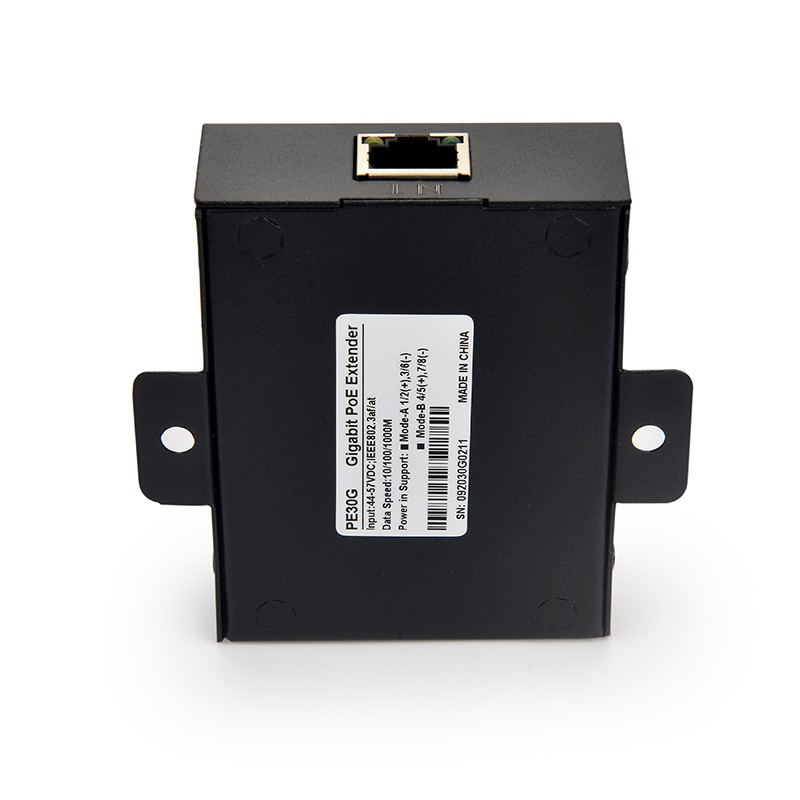
This method operates at the physical layer of your network. The device sits inline between your source and your endpoint. It actively regenerates the weakened data signal and passes the power through to the next segment. You do not need to configure any IP addresses. It functions entirely as a plug-and-play solution.
This is arguably the best approach for brownfield environments. You utilize existing cable runs to push connectivity from 100m up to 500m. Installing a POE Extender completely avoids the cost and labor of pulling new electrical drops.
Many modern network switches built for surveillance offer a unique hardware toggle. You simply flip a switch to activate "Extend Mode." This function intentionally drops the data transmission speed down to 10Mbps. In exchange for this massive speed reduction, the switch can push signals up to 250 meters.
This option costs zero additional dollars. However, you sacrifice critical bandwidth. It serves perfectly for low-bitrate IP cameras. It fails entirely if you need to power a high-bandwidth device like a modern access point or a multi-sensor camera array.
You can place a powered PoE Switch or an injector exactly at the 100-meter mark. This active device acts as a hard repeater. It essentially resets the 100-meter distance clock while injecting a fresh supply of power.
This method carries a significant limitation. You absolutely must have a localized AC power outlet at that 100-meter midspan point. If you lack accessible AC power in a ceiling or a conduit box, this method defeats the entire purpose of remote power delivery.
Cabling manufacturers now produce heavy-duty lines specifically engineered for distance. These cables feature heavy-gauge copper conductors, typically measuring 22 AWG instead of the standard 24 AWG. They also feature heavy shielding to block interference.
Using specialized PoE Cable allows you to push signals up to 150 or even 200 meters natively. You avoid placing active electronics in the middle of the run. The major trade-off is the labor. You must completely repull the entire line from the network closet to the endpoint.
Extension Method | Max Distance | Bandwidth | Complexity | Best Use Case |
|---|---|---|---|---|
Inline Extender | Up to 500m | 100Mbps - 1Gbps | Low | Retrofitting existing buried copper lines |
Switch Extend Mode | 250m | 10Mbps | Lowest | Low-bitrate single IP cameras |
Midspan Switch | 200m+ | 1Gbps+ | Medium | Midway points possessing AC power |
Specialized Cable | 150m - 200m | 1Gbps | High | New installations requiring no inline points |
Professionals often debate whether to use copper extenders or switch entirely to fiber optics. Both technologies serve specific roles. We must build a transparent framework to help you decide. Knowing when to abandon copper is just as important as knowing how to extend it.
Extenders shine in specific operational scenarios. You should default to this solution under the following conditions:
Retrofit Environments (Brownfield): The existing copper infrastructure is already buried under concrete or routed through complex walls. Replacing it is too disruptive.
Budget Constraints: You need an immediate deployment. You cannot afford splicing tools, specialized transceivers, or specialized fiber technicians.
Shorter Extensions: The total required distance from the switch to the endpoint remains comfortably under 400 to 500 meters.
There are strict scenarios where copper extenders will fail your project. You must pivot to fiber optics in these situations:
Distance Exceeds 500m: Power loss across multiple daisy-chained extenders becomes mathematically unsustainable. You cannot push enough wattage to boot the edge device.
Lightning Risk (Outbuildings): Running outdoor copper lines between separate buildings creates a massive lightning rod. A strike will send a catastrophic voltage spike back into your main building. Fiber offers native galvanic isolation because glass does not conduct electricity. It perfectly protects indoor switches from outdoor voltage spikes.
Multi-Gigabit Requirements: Most extenders cap their data throughput at 1Gbps or lower. If you need to backhaul a 10Gbps aggregate link, fiber is your only viable path.
Requirement | Copper Extender | Fiber Optic |
|---|---|---|
Speed of Installation | Fast (Plug-and-Play) | Slow (Requires Splicing/Transceivers) |
Distance limit | ~500 Meters Max | 10+ Kilometers |
Power Delivery | Carries Power Natively | Requires Local Edge Power |
Surge Vulnerability | High (Requires Surge Protectors) | Zero (Galvanic Isolation) |
Real-world installations rarely match perfect laboratory conditions. Installers face distinct physical challenges in the field. You must understand how to manage power loss and environmental hazards to ensure system stability.
You can string multiple extenders together to cover greater distances. We call this daisy-chaining. However, you pay a strict power penalty for every unit you add. Each inline device consumes internal power to run its amplification circuitry. This typically ranges from 2 to 4 watts per unit.
You must carefully calculate your source budget. Consider this scenario: You want to power a 30W PTZ camera located 400 meters away. You will need three extenders. The extenders consume roughly 10W combined. The long copper wire will lose another 15W to 20W due to resistance. To successfully power that 30W camera, you must use a massive IEEE 802.3bt 90W injector at the source. If you start with only a 30W source, the camera will never turn on.
Installers sometimes purchase Copper-Clad Aluminum (CCA) wire to save money. This choice is catastrophic for long-run networks. Aluminum possesses significantly higher electrical resistance than copper. When you push PoE over long distances, CCA wire causes massive voltage drops. The wire can even overheat and melt under high wattage loads. You must mandate 100% bare copper material for any extended-distance run.
Lightning strikes and static buildup destroy network gear. If you route cables outdoors to reach a gate or a parking lot, you invite disaster. Industrial-grade surge protectors must be installed at both ends of the run. Place one near the outdoor camera and one right before the line enters the main building. Failing to ground the line properly guarantees equipment burnout during the first severe thunderstorm.
Evaluating specification sheets can feel overwhelming. Manufacturers use various acronyms and marketing terms. You can simplify your purchasing decision by focusing on four critical bottom-of-funnel criteria.
Your extender must match the power demands of your edge device. Check the IEEE standards. If you are powering a basic fixed dome camera, IEEE 802.3at (30W) compliance works perfectly. If you are deploying outdoor heated cameras, lighting arrays, or Wi-Fi 6 access points, you must purchase a unit supporting IEEE 802.3bt (60W or 90W).
Location dictates the hardware enclosure. Indoor units feature simple plastic housings. If you plan to install the device in an outdoor junction box or mount it to a pole, mandate an IP67 waterproof enclosure. You must also verify the operating temperature range. Industrial units should safely operate anywhere from -40°C up to 75°C.
Not all devices support daisy-chaining. Some internal architectures block secondary amplification. Always check the manufacturer specifications for maximum cascade limits. Look for explicit phrasing such as "Supports up to 4 units in series." Buying non-cascadable units will stall your deployment.
The best extenders act invisibly on your network. Verify the device operates purely unmanaged. It should pass through all VLAN tags, MAC addresses, and routing protocols without interference. You should never need a software interface to configure an inline repeater.
Extending a network past 100 meters requires careful planning, but it does not demand a complete infrastructure overhaul. By properly assessing your power budget and measuring your true required distance, you can deploy a reliable retrofit. Always factor in the environmental risks before pulling cable.
Our final verdict remains clear. High-quality inline extenders provide the most efficient bridge for 100m to 500m gaps. As long as you utilize 100% pure copper wire and respect the daisy-chain power penalty, the system will run flawlessly.
Your next step is simple. Calculate the exact wattage required by your edge device, measure the run distance, and browse a curated selection of industrial waterproof extenders to bridge the gap.
A: Yes. You can usually daisy-chain up to 4 or 5 units in series depending on the exact model. However, you must account for the power drop at each node. The maximum functional distance for this method tops out around 500 meters before power delivery fails.
A: Standard inline extenders maintain full 10/100/1000Mbps bandwidth across the extended run. However, if you rely on a switch's built-in "Extend Mode" toggle, the hardware intentionally drops your data speed down to 10Mbps to achieve the extra distance.
A: No. They do not require a separate local AC power outlet. They draw the small amount of power they need directly from the source switch or injector. They then pass the remaining power forward to the edge device.
A: You should always use solid pure copper Cat6 or Cat6a cabling. Look for lower gauge numbers, such as 23 AWG or 22 AWG, which indicate thicker copper. You must never use Copper-Clad Aluminum (CCA) wire for power delivery.


