
5F, W2, Chengxin Building , Tian An Shen Chuang Valley Industrial Center, Fenggang Town, Dongguan City, Guangdong Province,China 523681
Views: 0 Author: Site Editor Publish Time: 2026-09-23 Origin: Site


Deploying commercial tablets and POS systems using standard AC power and Wi-Fi introduces unacceptable operational risks. Signal congestion frequently disrupts daily transactions in high-density environments. Dropped payments frustrate customers and directly impact your daily revenue. Furthermore, running expensive electrical routing through commercial spaces severely complicates physical installations.
You need a resilient method to ensure constant device up-time. Relying on wireless networks for critical retail or industrial operations often leads to connection instability. You cannot afford to lose your network connection during peak business hours. Overhauling building electrical grids simply costs too much time and resources.
Utilizing a POE Driver or adapter provides an elegant solution. It delivers concurrent power and stable data over a single Ethernet cable. This guide gives IT procurement and operations managers an evidence-based framework. We will help you evaluate, select, and deploy PoE infrastructure effectively. You will learn how to bypass crowded wireless channels and ensure absolute reliability for commercial tablet fleets.
Reliability over Specs: Wired PoE connections offer <5ms latency and immune data transfer, crucial for POS transaction continuity compared to congested Wi-Fi channels.
Hardware Pathways: Choosing between native PoE tablets, a PoE to USB-C adapter, or a PoE splitter depends on existing hardware ecosystems (e.g., iOS vs. Android) and budget.
Power Realities: Standard IEEE 802.3af/at limits apply; actual delivered wattage at the device is lower than the switch output (e.g., 15.4W switch output yields ~12.95W at the tablet).
Commercial POS systems and self-service kiosks demand absolute network stability. You cannot rely on Wi-Fi in high-density retail or corporate environments. Neighboring businesses and customer smartphones flood the 2.4GHz and 5GHz wireless spectrums. This interference causes severe channel congestion. When wireless signals drop, your payment gateways stall. Dropped payments immediately lead to customer friction and lost sales. Wired Ethernet connections eliminate this interference entirely. They provide a dedicated, shielded pathway for critical transaction data.
Physical safety and security also drive the adoption of wired network power. Relying on traditional AC power requires wall outlets near every device. Eliminating AC electrical outlets reduces fire hazards significantly. It simplifies your local building code compliance. You also prevent staff or customers from unplugging or tampering with power sources. Devices draw low-voltage direct current, inherently protecting users from dangerous shocks.
Managing infrastructure centrally offers massive operational advantages. A single Ethernet cable connects your endpoint device directly to a managed network switch. This topology empowers your IT team. They can execute remote hard-reboots of unresponsive tablets directly from the switch console. You simply cycle the power on that specific port. This capability drastically reduces physical IT support tickets and eliminates expensive truck rolls.
Installation costs shift favorably when you adopt network-powered hardware. Hiring certified electricians to run hidden AC conduit work drains your deployment budget. Electricians must pull permits and schedule inspections. Conversely, running low-voltage Cat5e or Cat6 cable costs far less. IT technicians can route these network cables up to 100 meters (328 feet) without requiring specialized electrical licenses.
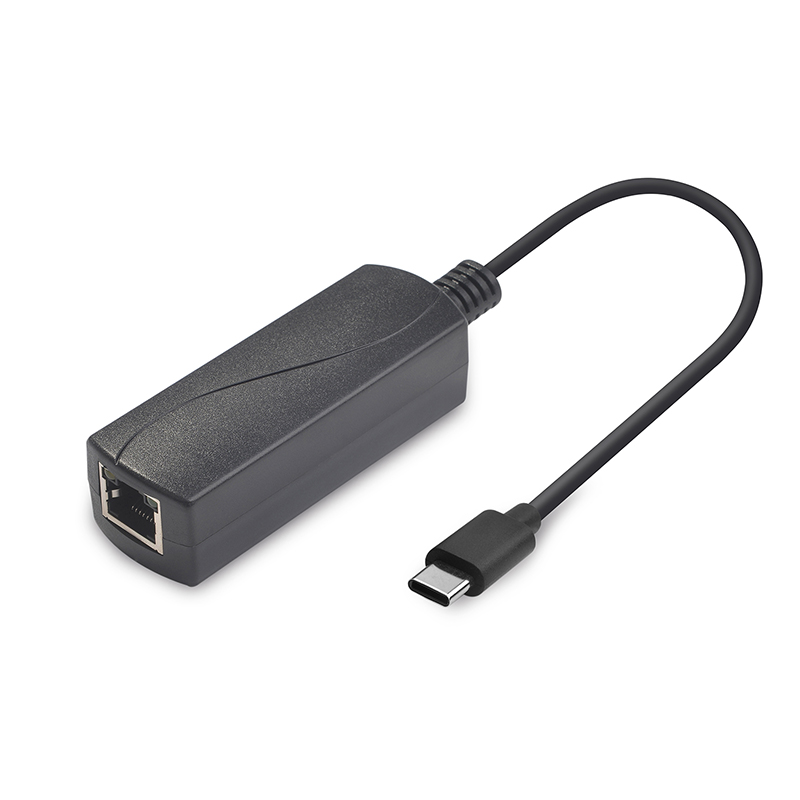
You must select the correct hardware pathway for your specific tablet fleet. IT managers generally choose between three distinct implementation methods. Each method carries specific benefits and integration challenges.
A PoE to USB-C Adapter combines inbound network data and power into a single USB-C output cable. You plug this directly into your modern tablet. This method works perfectly for retrofitting existing consumer-grade fleets. If you deploy iPads or Samsung Galaxy Tabs for commercial use, adapters provide plug-and-play functionality. However, you must consider the physical trade-offs. The adapter introduces an additional physical point of failure. It also requires careful cable management within your tablet enclosures to hide the bulky adapter block.
A PoE Splitter performs a slightly different function. It receives the unified network signal and separates it into two distinct cables. One cable provides DC power (often via a barrel jack or Micro-USB), and the other provides RJ45 data. You use splitters primarily for legacy hardware. Specialized peripherals like older receipt printers or aging barcode scanners lack unified USB-C inputs. A splitter bridges the gap between modern network infrastructure and legacy endpoint connections.
Native tablets feature built-in 802.3af/at circuits directly on the motherboard. You do not need any external dongles or adapters to connect them. You simply plug the network cable directly into the back of the screen. These devices suit clean-slate industrial or commercial rollouts. They prioritize 24/7 survivability and simplify your mounting process. Native screens mount flush against walls using standard VESA brackets or electrical gang boxes.
Hardware Pathway | Best Use Case | Primary Advantage | Notable Drawback |
|---|---|---|---|
Adapter | Consumer iPads / Androids | Allows use of standard off-the-shelf tablets. | Requires extra enclosure space for cable management. |
Splitter | Legacy Kiosks / Printers | Powers devices lacking modern USB-C ports. | Leaves two cables exposed at the device end. |
Native Tablet | Industrial / Clean-slate rollouts | Maximum reliability and flush wall mounting. | Higher initial per-unit hardware price. |
You must accurately match your network switch capabilities to your endpoint power demands. Failing to calculate power budgets results in reboot loops and device failures. The IEEE standard dictates exactly how much energy your switch can push down the cable.
Power dissipates as it travels through copper wires. We call this cable loss. You must account for this drop-off when planning your deployments.
Type 1 (802.3af): The switch delivers a maximum of 15.4W at the source. Due to cable resistance, you receive effectively ~12.95W at the tablet. This wattage easily sustains basic meeting room schedulers and small digital signage.
Type 2 (802.3at / PoE+): The switch outputs a maximum of 30W at the source. You receive effectively ~25.5W at the tablet. You absolutely need this higher standard for larger screens (10 inches and above). High-brightness kiosks and POS systems running intensive local processing also require this power level.
Standard network power is highly secure because it remains inactive until requested. The Power Sourcing Equipment (PSE) and Powered Device (PD) execute an automatic safety negotiation. We call this the handshake protocol. When you plug in a device, the switch sends a low-voltage pulse to detect a valid signature. If it verifies the signature, it categorizes the device's power class. Only then does the switch deliver the full voltage. This prevents accidental overloads and ensures safe delivery. If a cable shorts out, the switch instantly cuts the current.
Pushing continuous electricity into consumer tablets generates significant thermal output. Consumer devices use internal lithium-ion batteries. Constant charging creates heat, which causes these batteries to degrade and eventually swell. This swelling ruins screens and pops enclosures open. Industrial options solve this issue. They often utilize fanless cooling designs and IP54 ratings to dissipate heat passively. Many industrial boards remove the battery entirely. They run exclusively on direct line power, yielding dramatically longer operational lifespans.
Different commercial environments demand unique hardware configurations. You must tailor your endpoint capabilities to match specific business operations. Hardware requirements vary wildly between retail fronts and industrial kitchens.
Payment environments require flawless data transmission. Retailers demand Gigabit data passthrough and absolute network stability for payment processing. A split-second network drop during a credit card authorization creates massive headaches. These unattended kiosks also require broad support for peripheral expansion. You frequently need to connect NFC readers, RFID scanners, and receipt printers simultaneously. Your chosen hardware must support these data streams while drawing power from a single uplink.
Corporate offices prioritize aesthetics and security. Meeting room schedulers require low-profile wall mounting. They must sit flush against the glass or drywall. Native compatibility with standard US Gang boxes is highly desirable here. Additionally, these endpoints demand tight software control. You need Mobile Device Management (MDM) integration to lock the screens into single-app kiosk mode. The hardware must also support "auto-start on power" capabilities. If the building loses power, the tablets must boot themselves automatically once the network switch comes back online.
Restaurant kitchens present incredibly harsh environments. Kitchen Display Systems face constant exposure to airborne grease, high heat, and moisture. Environmental resilience is mandatory. You need screens with high IP ratings to survive daily cleaning protocols. For distributed digital signage, you need the capability for remote content updates alongside stable power delivery. Ethernet connections allow marketing teams to push massive 4K video files to hundreds of screens instantly without overwhelming the local Wi-Fi.
Evaluating and selecting the right hardware prevents costly deployment mistakes. Use this proven five-step framework to guide your IT procurement strategy. It ensures you map physical constraints to operational demands correctly.
Step 1: Infrastructure Audit. You must audit your existing network closets. Does the facility have existing 802.3at-capable switches? If your current switches lack sufficient power budgets, you will require localized midspan injectors to power the tablets.
Step 2: Operating Uptime Requirements. Determine the operational hours. Does the use case demand 24/7 continuous operation? If so, you must eliminate standard consumer tablets without explicit thermal management. Unmanaged consumer batteries will fail under continuous loads.
Step 3: Software & OS Lock-in. Analyze your software dependencies. Does the deployment explicitly require Google Mobile Services (GMS) or the Apple iOS ecosystem? Most rugged industrial tablets lack GMS certification. If you need native Google Maps or the Apple App Store, you must use commercial consumer tablets paired with specialized adapters.
Step 4: Physical Constraints. Evaluate your installation locations carefully. Do you have adequate enclosure space to hide external adapters and excess cabling? If you face strict aesthetic requirements, you usually require flush-mount native hardware instead of multi-component setups.
Step 5: Scalability Validation. You must calculate long-term hardware lifecycles. Analyze the expected failure rates of multi-component adapter setups versus native ruggedized units. While complex adapter setups might look cheaper initially, frequent component replacements across hundreds of locations drain operational budgets over a three-year cycle.
Selecting the appropriate network power solution transforms your commercial operations. The right driver or integrated tablet solution bridges the gap between IT network reliability and commercial application flexibility. It eliminates wireless channel congestion and simplifies building compliance. You gain the ability to reboot unresponsive devices remotely and push large data files without dropping retail transactions.
We strongly recommend starting with a small-scale pilot program. Deploy three to five units initially. Use this pilot phase to test thermal performance under continuous load. Verify your MDM compatibility and confirm that your network switch handles the power limits flawlessly. Monitor these units for several weeks before executing a fleet-wide rollout.
Take action today to secure your network infrastructure. Request a hardware consultation with your integration partner. Review detailed technical spec sheets to verify IEEE standard matching. Order a sample unit to evaluate the physical mounting process and confirm it meets your aesthetic and operational requirements.
A: The strict standard limit is 100 meters (328 feet) over standard Cat5e or Cat6 cabling. If you need to push power and data further, you must install an active midspan repeater to boost the signal. Without a repeater, data packets degrade and voltage drops below usable levels.
A: Yes, you can. Standard configurations allow the Ethernet cable to act solely as a dedicated power source. The device can continue leveraging existing Wi-Fi profiles for data transfer if you configure your network settings to prioritize wireless routing.
A: No, the vast majority do not. Consumer tablets like iPads and basic Android models lack internal decoding hardware. They require a specialized adapter to negotiate and accept network power and data over an Ethernet connection.
A: No, it will not. Standard 802.3 compliant devices feature intelligent safety handshakes. The switch actively monitors the connection. It immediately cuts off the power supply if it detects a short circuit, fault, or abnormal overload, completely protecting your endpoint device.


