
5F, W2, Chengxin Building , Tian An Shen Chuang Valley Industrial Center, Fenggang Town, Dongguan City, Guangdong Province,China 523681
Views: 0 Author: Site Editor Publish Time: 2026-09-30 Origin: Site


Upgrading core network switches to standard 802.3af/at (48V) often creates a critical incompatibility across your infrastructure. You suddenly face connection failures when dealing with existing 24V passive endpoints. These endpoints frequently include legacy access points, WISP radios, and older IP cameras. Forcing standard 48V power directly into a 24V passive device risks immediate and severe hardware damage. Conversely, running a parallel power infrastructure completely defeats the primary purpose of investing in a newly upgraded, centralized PoE switch.
Fortunately, an inline step-down adapter provides an architecturally sound and practical solution to this widespread problem. By deploying this specific hardware, you can bridge modern managed switches and legacy endpoints effortlessly. You will learn exactly how these devices resolve interoperability issues without risking hardware failure or network downtime. We will explore deployment strategies, evaluate equipment requirements, and outline implementation risks so you can maintain a resilient network.
Cost Avoidance: Inline converters eliminate the need to prematurely rip and replace functional legacy 24V hardware (like older Ubiquiti UniFi APs).
Network Centralization: Allows legacy devices to be powered directly from central managed 48V PoE switches, enabling remote power-cycling and centralized UPS battery backup.
Risk Mitigation: Active converters negotiate power safely via IEEE 802.3af/at standards before stepping down voltage, preventing accidental "always-on" passive power burns.
Cleaner Topology: Removes the clutter and multiple failure points associated with deploying dozens of standalone midspan PoE injectors.
Network administrators frequently encounter a stubborn technical conflict when modernizing IT environments. You must understand the fundamental difference between Active PoE and Passive PoE to grasp this challenge. Active PoE follows IEEE 802.3af or 802.3at standards. It actively negotiates power delivery at 48V. The switch and the endpoint communicate before any significant voltage travels down the cable. Passive PoE operates entirely differently. It forces 24V power continuously, without any initial handshake or safety check.
This difference creates a massive interoperability problem. IT professionals frequently discuss this pain point on Spiceworks and Reddit forums. You might attempt to mix standard PoE switches with legacy 24V Ubiquiti UniFi or MikroTik equipment. If the active switch cannot detect a compliant signature, it refuses to send power. Your legacy access point remains offline. If you manually force the switch port to output raw 48V, you will instantly fry the 24V passive device.
You need a reliable resolution to bridge this gap. A successful fix must meet three strict success criteria. First, it must maintain Gigabit data speeds to prevent network bottlenecks. Second, it must operate without requiring separate AC power outlets. Finally, it must ensure your managed switch can still accurately monitor the port's power draw.
Assuming all Power over Ethernet standards are universally backwards compatible.
Forcing switch ports into passive mode without verifying endpoint voltage requirements.
Deploying non-Gigabit adapters in environments requiring high data throughput.
An inline 48V to 24V POE Converter actively bridges the gap between incompatible standards. It functions as an intelligent proxy between the network switch and the endpoint. The step-down mechanism follows a precise sequence to ensure safe operation.
The converter connects to the 48V switch port and presents a valid IEEE 802.3af/at signature.
The switch recognizes this signature and safely outputs 48V power.
The internal circuitry of the converter intercepts this incoming power.
It steps the voltage down internally from 48V to a steady 24V.
It delivers passive 24V power to the legacy endpoint while passing data through seamlessly.
You should understand basic pinout realities to deploy these units effectively. Ethernet cables contain eight internal wires. Gigabit active connections typically transmit data across all pairs. However, passive 24V systems often isolate power to specific pairs. They typically place Data on pins 1, 2, 3, and 6. They deliver Power on pins 4, 5 (positive) and 7, 8 (negative). The inline proxy handles this electrical translation internally. It ensures data integrity remains intact while safely routing stepped-down power.
Function | Standard 802.3af/at (Active) | Legacy 24V (Passive) |
|---|---|---|
Voltage Level | 44V - 57V (Nominal 48V) | Fixed 24V |
Negotiation | Required (Hardware Handshake) | None (Always On) |
Typical Power Pairs | Varies by Mode (A or B) | Pins 4,5 (+) and 7,8 (-) |
You can deploy these converters in various physical form factors. Most resemble small, inline dongles or compact rectangular blocks. You typically install them at the switch rack inside your wiring closet. Alternatively, you can deploy them directly at the endpoint drop above a ceiling tile. Rack installations keep ceiling spaces clean, while endpoint installations help mitigate voltage drop on long cable runs.
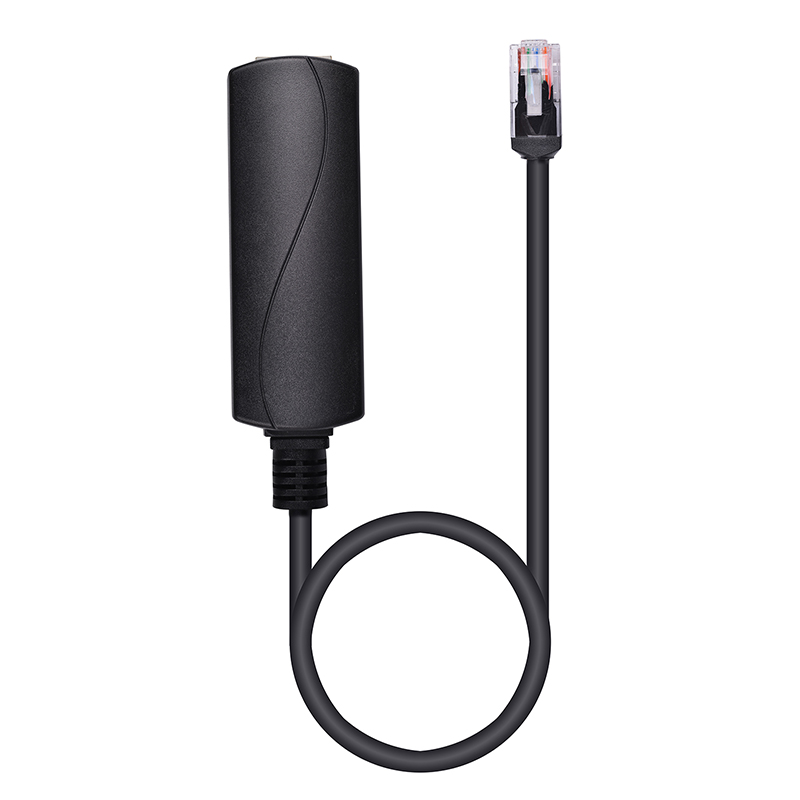
You must evaluate specific technical criteria before purchasing a 24V PoE Converter for your network. Not all adapters offer the same performance or reliability. Network administrators often fail to specify Gigabit data rate support. Choosing a Gigabit adapter (10/100/1000 Mbps) is absolutely critical. Older, cheaper converters only support Fast Ethernet (10/100 Mbps). These older models will severely bottleneck modern access points and high-definition IP cameras.
Next, you must calculate the wattage capacity output. You need to size the converter appropriately for your specific endpoint. Check the manufacturer documentation of your legacy device. Verify its maximum power draw. Many standard 24V adapters output 0.5A, which provides roughly 12W of power. If your legacy radio or long-range access point demands more power, you must source a converter capable of handling higher loads.
Thermal limits and build quality also require careful consideration. Stepping down voltage generates heat. You must assess heat dissipation capabilities. This becomes especially important when deploying dozens of units in densely packed server racks. Unventilated WISP enclosures face similar thermal challenges. High ambient temperatures can cause poorly built converters to throttle or fail entirely.
Finally, you must verify standards compliance. Ensure the 48V input side is fully IEEE 802.3af or 802.3at compliant. Genuine compliance prevents port faults on your managed switch. Non-compliant adapters might trigger power surges or cause the switch to shut down the port defensively.
IT teams frequently debate the merits of active step-down converters versus standalone passive injectors. You must understand the architectural implications of both approaches to design a resilient network.
The standalone PoE Injector remains a popular fallback option. Manufacturers often include them in the box with legacy access points. They guarantee immediate compatibility. However, they introduce significant architectural drawbacks. They require dedicated AC power outlets nearby. They create massive cable clutter when deployed en masse inside a server rack. Most importantly, they break centralized remote reboot capabilities. If an access point locks up, you cannot bounce the port from your switch management interface. You must physically unplug the injector.
The inline step-down converter offers a far more sophisticated architectural approach. It leverages your existing switch infrastructure completely. It utilizes your centralized UPS battery backup, ensuring endpoints stay online during brief power outages. It dramatically cleans up rack cabling. Furthermore, it restores port-level remote management. You can power-cycle a frozen legacy access point directly from your desk.
Feature | Standalone PoE Injector | Inline Step-Down Converter |
|---|---|---|
Requires AC Outlet | Yes | No (Powered via Switch) |
Remote Power-Cycling | No (Manual Unplug Required) | Yes (Via Switch Port Management) |
Rack Clutter | High (Multiple Power Bricks) | Low (Small Inline Dongle) |
UPS Integration | Requires dedicated UPS for Injectors | Uses Central Switch UPS |
While converters clearly win in scalable, managed environments, they do carry minor downsides. Each adapter adds a small physical point of failure per line. They also require a slight upfront cost per unit. However, for one-off residential fixes, a standalone injector remains perfectly acceptable. For enterprise or campus networks, converters provide the superior architectural verdict.
You must navigate several physical and electrical realities when deploying step-down converters across a wide area network. Cable distance limitations present the most common rollout risk. Stepping down voltage can amplify the effects of voltage drop over long Ethernet runs. Physics dictates that lower voltage experiences more severe degradation over copper wiring than higher voltage.
If your cable runs exceed 50 meters, we strongly recommend keeping the converter closer to the endpoint. Placing the adapter at the ceiling drop rather than the server rack minimizes the distance the 24V power must travel. This practice ensures your legacy device receives adequate voltage to operate reliably.
You must also carefully calculate your total switch power budget. Remind your IT admins to account for efficiency losses. Converters bleed a small amount of power as heat during the step-down process. A legacy access point rated for 12W might actually draw 14W or 15W from the 48V switch port. If you populate a 48-port switch entirely with converters, these minor efficiency losses accumulate quickly. You could accidentally exceed the maximum PoE budget of your switch.
Finally, you must distinguish between outdoor and indoor environments. Highlight the risk of using standard, non-weatherproof adapters in exposed locations. WISP tower deployments and exterior security camera setups demand hardened equipment. Moisture and extreme temperature fluctuations will destroy standard indoor converters rapidly. Always source IP-rated, ruggedized adapters for outdoor installations.
Document the exact power draw of every legacy endpoint before ordering converters.
Test one converter on your longest cable run before rolling out the full batch.
Label both ends of the Ethernet run to indicate a 24V passive endpoint is attached.
Deploying inline step-down converters delivers immense business value for network administrators. You can safely extend the operational lifespan of perfectly functional legacy 24V equipment. Simultaneously, you achieve the goal of modernizing your core switching infrastructure to standard 802.3af/at. This dual achievement prevents premature hardware replacements while keeping your network architecture centralized, clean, and highly manageable.
Your shortlisting logic should rely on a thorough internal audit. Check the maximum wattage requirements and Gigabit data necessities of your legacy devices before purchasing converters in bulk. Avoid older Fast Ethernet models to preserve network throughput. Keep cable distance limitations and power budgets firmly in mind during the planning phase.
You are now equipped to resolve standard and passive PoE incompatibilities permanently. Direct your IT procurement team to review a specific catalog of Gigabit-rated step-down converters. Alternatively, you can contact hardware sales engineers to validate your deployment architecture before finalizing your infrastructure upgrade.
A: Not if you select a Gigabit-rated adapter. Modern Gigabit converters maintain full 10/100/1000 Mbps data rates seamlessly. You must beware of cheaper, older models, as they are physically limited to Fast Ethernet (10/100 Mbps) and will severely bottleneck network traffic.
A: Yes. It is the widely accepted standard workaround. You can reliably power legacy 24V passive access points, such as the older UAP-AC-Lite or UAP-LR, directly from any modern, standard 802.3af/at managed switch without causing hardware damage.
A: No. You should leave the switch port on standard auto-sensing 802.3af/at. The inline converter handles the active negotiation with the switch automatically. It then performs the passive voltage step-down internally before passing power to the endpoint.
A: If the switch auto-negotiates properly, it simply refuses to supply power, and the device stays offline. If the switch port is manually forced into a passive 48V mode, the high voltage will likely permanently destroy the 24V endpoint's circuitry.


