
5F, W2, Chengxin Building , Tian An Shen Chuang Valley Industrial Center, Fenggang Town, Dongguan City, Guangdong Province,China 523681
Views: 0 Author: Site Editor Publish Time: 2026-10-02 Origin: Site


Upgrading network switches often introduces an unexpected headache. You plug a legacy 24V access point, like an older Ubiquiti or Mikrotik model, into a modern PoE+ switch. Surprisingly, it refuses to power on. Worse, you might fear the new switch will burn out your older networking gear. This scenario frustrates many IT professionals and home lab enthusiasts alike.
This happens because modern IEEE 802.3af/at standard switches output 48V using a smart negotiation protocol. They must verify compatibility before sending any electricity down the line. In contrast, older 24V equipment expects "dumb," continuous power without any digital handshake. You need a reliable bridge between these two conflicting technologies. We will explore the two primary ways to power these legacy devices safely. You can use a dedicated 24V passive PoE injector at the power source. Alternatively, you can deploy an inline step-down converter right at the network edge. Let us break down the safest approach for your network.
Safety First: 24V Passive PoE is an "always-on" power delivery method with no safety handshake, posing a hardware damage risk if misconfigured.
The Smart Bridge: A 48V to 24V POE Converter acts as a translator. It successfully negotiates with a standard 48V IEEE 802.3af/at switch and safely steps down the voltage to 24V for legacy devices.
Distance Physics: 48V transmission inherently suffers less voltage drop than 24V over long cable runs, making converters placed near the end-device superior for extended distances.
Management: Using standard 48V switches with step-down converters allows IT admins to retain remote power-cycling capabilities, which are often lost when using standalone passive injectors.
Modern network infrastructure relies heavily on standardized protocols. The IEEE 802.3af and 802.3at standards dictate how switches deliver power over ethernet. These standards utilize a nominal 48V output. More importantly, they require a specific digital "handshake" before releasing any power. When you plug a device into a modern switch, the switch sends a harmless, low-voltage test pulse. It looks for a specific 25k ohm signature resistance on the other end. If the end device does not signal it needs power, the switch keeps the port unpowered. This intelligent design prevents electrical damage to non-PoE devices like laptops or standard desktop printers.
Legacy 24V devices operate in a completely different reality. Older wireless bridges, specific IP cameras, and legacy access points lack this required negotiation chip. They simply do not know how to perform the handshake. When you connect one of these older devices to a modern 48V switch, the switch sends its test pulse. It receives no valid response. Consequently, the switch assumes the device does not need power. It keeps the port turned off. The legacy device remains completely dead.
This brings us to a common beginner fear: the burnout myth. Many novice technicians worry about "frying" their older 24V equipment by plugging it into a modern 48V switch. A standard 48V switch will not fry a 24V device directly. It simply will not turn on. The real danger lies in the opposite scenario. Accidentally plugging a standard, non-PoE device into a forced 24V passive line causes immediate harm. The constant voltage hits the network interface card directly, often releasing the dreaded "magic smoke" and ruining the hardware.
To understand the legacy approach, we must define passive PoE. Passive power over ethernet forces continuous direct current (DC) down specific ethernet pinouts. It typically uses Pins 4/5 for positive voltage and Pins 7/8 for negative voltage. The key characteristic here is the absolute lack of sensing. The power source does not check what sits on the other end of the cable. It simply blasts a constant 24V down the wire the moment you plug it in.
Powering these legacy access points usually requires specific external hardware. Most administrators deploy a dedicated Passive PoE Injector. You plug this small brick into a wall outlet near your core switch or router. You run a patch cable from the switch to the injector's LAN port. Then, you run another cable from the injector's PoE port out to the legacy device. While this works, it creates several operational headaches.
Relying on passive injectors introduces major drawbacks in modern IT environments. Consider the following common issues:
Severe Cable Clutter: Every legacy device requires its own injector brick and secondary patch cable. A rack with ten legacy access points quickly turns into a tangled mess of power cords and ethernet wires.
Lack of Central Management: Dumb injectors do not talk to your management software. You cannot reboot a frozen access point via a switch port software interface. You must physically walk to the rack and yank the power cord out of the wall.
Active Traps for Technicians: Passive ports stay hot permanently. An unaware technician might unplug the access point and plug a laptop into that exact cable to test the network. The hot 24V line will immediately hit the laptop's motherboard, causing irreversible hardware failure.
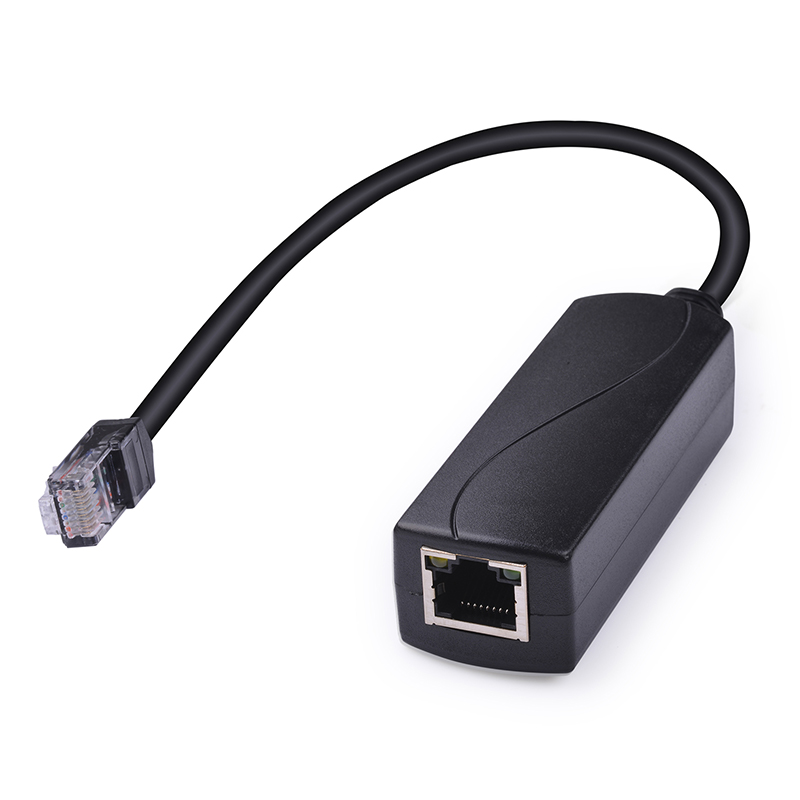
Technology offers a much smarter way to bridge this hardware gap. A step-down converter acts as a dual-role translator. It bridges the gap between smart 48V switches and dumb 24V endpoints. This specific PoE Module actively listens to the switch on one side while providing continuous power on the other.
The mechanics of step-down conversion follow a strict two-stage process:
Input Stage: The converter acts as a compliant IEEE 802.3af/at Powered Device (PD). When connected to the modern switch, it successfully performs the 25k ohm handshake. The switch recognizes the converter, deems it safe, and releases the standard 48V power.
Output Stage: The internal circuitry receives the 48V power. It safely steps down the voltage to exactly 24V. It strips away any negotiation requirement for the downstream device. Finally, it outputs a passive 24V connection directly to the legacy AP or camera.
Implementation is remarkably straightforward. These devices typically take the form of an inline dongle or a small physical block. You place them at the very end of the cable run, right before the legacy endpoint. You run standard 48V power through the walls or ceilings. You only convert the power at the last possible foot of the connection.
This approach protects your overall system integrity. It allows businesses to maintain a fully standardized, intelligent 48V switch environment. You do not have to throw away perfectly functional 24V endpoints just because you upgraded your central rack. The core infrastructure remains safe, modern, and fully compliant.
Making an informed decision requires looking at the raw physics, management capabilities, and safety profiles of both options. We can compare these two approaches across several critical network deployment dimensions.
Feature Dimension | Dedicated Passive Injector | Step-Down Converter |
|---|---|---|
Standard Compliance | Non-standard (Proprietary) | IEEE 802.3af/at Compliant |
Remote Power Cycling | No (Requires physical unplugging) | Yes (Via switch port management) |
Maximum Effective Distance | ~150 to 200 feet (Voltage drop risk) | ~328 feet / 100 meters (Standard limit) |
Accidental Damage Risk | High (Always-on hot ports) | Low (Only the final patch cable is hot) |
The physics of power over ethernet dictate how far you can push electricity down copper wires. A simple rule governs this transmission: higher voltage equals lower current. Lower current means less power dissipates as heat along the cable run. When you use an injector to push 24V from the server rack, you face severe limitations. The low voltage suffers significant drop over distance. Pushing 24V often maxes out reliably at 150 to 200 feet. Beyond that, the voltage drop causes the remote device to reboot randomly or fail entirely.
A step-down converter eliminates this distance limitation entirely. The core switch pushes a robust 48V through the walls. This higher voltage travels easily up to the standard ethernet limit of 328 feet (100 meters) without critical voltage drop. Stepping the power down at the very end of the line gives the legacy device a clean, stable 24V exactly where it needs it.
Network administrators value remote management above almost everything else. A passive injector operates as a "dumb" brick. It provides zero feedback to the network controller. If a remote wireless access point hangs or crashes, a technician must physically visit the network closet. They must locate the specific injector among a tangled mess of wires and physically unplug it from the wall.
Converters dramatically improve administrative control. Because the actual power originates from a fully managed 48V switch, administrators maintain complete authority. If a legacy 24V AP freezes up, the admin logs into the switch dashboard. They simply bounce the switch port via the software interface. The switch cuts the 48V power to the converter, which in turn kills the 24V power to the AP. This simple software command saves hours of physical troubleshooting.
Protecting expensive network equipment requires strict compliance protocols. Relying on passive injectors introduces massive risk into a server room. It requires strict labeling of patch panels and extreme discipline from IT staff. If a label falls off, someone will eventually plug standard equipment into a hot 24V line. The result is always destroyed hardware.
Converters keep the core infrastructure purely 802.3af/at compliant. The wall ports, the patch panels, and the long cable runs all remain completely safe. The switch will not power those lines unless a compliant device asks for it. The only "dumb" 24V segment in the entire building becomes the 1-foot patch cable sitting between the inline converter and the legacy AP high up on a ceiling.
Choosing between an injector and a converter depends entirely on your environment, scale, and long-term network strategy. Neither device is inherently bad, but using the wrong one in the wrong scenario causes significant headaches.
Hardware Selection Chart | ||
Deployment Scenario | Recommended Hardware | Primary Justification |
|---|---|---|
Single AP in a small home | Passive Injector | Lowest upfront requirement; no managed switch available. |
Enterprise rack with 10+ APs | Step-Down Converter | Eliminates brick clutter; enables remote port bouncing. |
Outdoor WISP Bridge (250ft run) | Step-Down Converter | Bypasses 24V voltage drop limits over long copper runs. |
Temporary field testing | Passive Injector | Quick to deploy without needing a full switch setup. |
You should use a passive injector primarily in strictly budget-constrained residential setups. They make sense for temporary deployments or single-device networks that completely lack a central PoE switch. If you only have a standard consumer router, an injector provides the necessary power without requiring a switch upgrade.
Conversely, you should transition to an inline 48V to 24V POE Converter whenever dealing with professional environments. Enterprise or prosumer rack environments migrating to fully managed PoE+ switches benefit immensely from this approach. They prove vital for long-distance outdoor cable runs to wireless bridges, commonly seen in WISP equipment. Furthermore, upgrading infrastructure with converters allows you to retain legacy access points. You keep your older hardware functional while still modernizing your central switching fabric.
Legacy 24V Passive PoE served a vital purpose in early networking. It offered a cheap, straightforward way to power devices before standard protocols became ubiquitous. Today, however, it stands as an outdated and potentially risky standard for modern, mixed-device racks. Forcing constant power down ethernet cables creates physical clutter, limits transmission distance, and introduces severe hardware damage risks for unaware technicians.
For any environment utilizing a modern managed switch, investing in an inline step-down converter remains the superior choice. It offers the most secure, reliable, and scalable way to support legacy 24V hardware. By keeping the core network strictly standard-compliant, you centralize management and extend effective power distances. Most importantly, you protect all non-PoE network appliances from accidental electrical damage. Modernize your power delivery without abandoning your functional legacy endpoints.
A: No. This is a common beginner myth. While cameras may have internal 12V components or a 12V DC barrel jack, their PoE ports are almost exclusively designed for standard 48V 802.3af/at. Using a 24V passive injector will likely underpower the device or permanently damage the camera's circuitry.
A: Not if you purchase a gigabit-rated converter. Quality converters isolate the power transformation from the data pairs, allowing full 10/100/1000 Mbps pass-through. Always verify the spec sheet before purchasing, as older legacy models were often capped at 10/100 Mbps.
A: They are designed to work perfectly with any standard IEEE 802.3af or 802.3at (PoE+) compliant switch. Simply ensure the total wattage required by your legacy 24V device does not exceed the converter’s maximum power output, which usually ranges around 15W to 24W.


